How Websites Display Real-Time Clocks (And Why They’re Not Always Accurate)
At first glance, a real-time clock on a website feels simple—just numbers ticking every second. But here’s the catch: most…

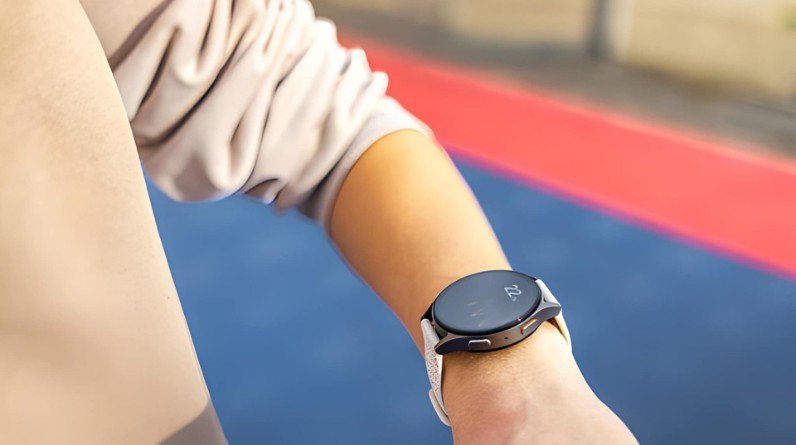
You probably never question the time on your watch—until it’s wrong. And when that happens, it feels surprising, because in everyday use, your Samsung Galaxy Watch just works. That reliability isn’t accidental.
Unlike traditional watches that rely only on internal mechanics, your smartwatch is part of a larger, interconnected system. It pulls time from highly accurate global sources and continuously corrects itself in the background—often without you ever noticing.
At the top of the chain are atomic clocks—the most accurate timekeeping devices ever created. Based on the oscillations of cesium atoms, these clocks define Coordinated Universal Time (UTC), which serves as the global time standard.
Every digital system—phones, servers, and smartwatches—ultimately traces its time back to this source. Everything downstream is just a progressively simplified version of that original signal.
Time from atomic clocks is distributed through Network Time Protocol (NTP) servers—geographically distributed systems that broadcast the correct time across the internet. Android devices, including the Galaxy Watch ecosystem, use a lightweight variant called SNTP (Simple Network Time Protocol), which is optimized for mobile hardware but delivers the same essential accuracy.
Your devices don’t guess the time—they ask these servers and adjust accordingly, typically within milliseconds of the true UTC value.
Most of the time, your Galaxy Watch gets its time from your smartphone. The phone syncs with NTP servers or cellular networks, then passes that corrected time down to the watch via the Galaxy Wearable app. This handoff typically takes just seconds once the connection is established.
This is why your watch updates almost instantly when your phone’s time changes—it’s receiving a direct, already-corrected signal.
The watch receives time updates via Bluetooth, Wi-Fi, or LTE. This happens frequently in the background throughout the day, so you never need to think about it.
Think of your watch as the final display in a chain of highly accurate systems—each link passing a more refined signal down to the next.
This is the most common method. As long as your phone’s time is correct—and it almost always is when automatic time is enabled—your watch will be too. Syncing typically happens within seconds of the devices pairing over Bluetooth.
If your watch has its own internet access, it can connect directly to time servers without relying on your phone at all. This matters most on standalone LTE Galaxy Watch models, where the watch operates independently during workouts or when you’ve left your phone behind.
GPS satellites carry atomic-clock-derived time signals, and your watch can tap into these whenever it has a GPS lock—such as during an outdoor run or hike. This adds a remarkably precise layer of correction that most users don’t realize is happening. Newer Galaxy Watch models, including the Ultra series, use dual-band GPS (L1 and L5 frequencies) for even faster satellite acquisition and more reliable time synchronization in dense environments.
Mobile networks broadcast time signals using a protocol called NITZ (Network Identity and Time Zone). When your watch or phone is connected to a cellular tower, it can receive accurate local time and time zone data simultaneously—which is why switching on your phone after landing in a new country updates the time almost immediately.
When your watch is offline, it relies on an internal quartz crystal oscillator to keep time. The crystal vibrates at a highly consistent frequency, and the watch counts those vibrations to track the passage of seconds. It’s the same fundamental technology as a traditional quartz watch—but with one important difference: the Galaxy Watch can correct any accumulated error the moment it reconnects to a time source.
No oscillator is perfect. Over time, tiny inaccuracies accumulate—this is called drift. Temperature changes, battery fluctuations, and manufacturing tolerances all play a small role. In practice, you’d only notice this if your watch was completely isolated from all sync sources for an extended period.
The moment your watch reconnects—whether to your phone, Wi-Fi, or a cellular network—it corrects itself instantly. This is what prevents drift from ever becoming a real problem in everyday use. The system is self-healing by design.
When connected, your Galaxy Watch is typically accurate to within milliseconds of global UTC standards. GPS synchronization can push this even tighter—into the range of tens of milliseconds or better, depending on signal quality.
Offline, accuracy depends entirely on the internal quartz oscillator, which introduces gradual drift the longer it goes without a sync.
| Time Period | Possible Drift (Offline) |
|---|---|
| 1 Day | Less than 1 second |
| 1 Week | A few seconds |
| 1 Month | Up to ~15 seconds |
| Device Type | Accuracy |
|---|---|
| Atomic Clock | Near perfect |
| Galaxy Watch (Connected) | Within milliseconds |
| Quartz Watch | ±15 seconds/month |
When you travel, your watch automatically detects and applies the correct local time zone using network data from cellular towers or internet sources. No manual adjustment is needed—it simply updates as your phone does.
DST changes are applied automatically based on your region’s rules. You don’t need to remember or adjust anything manually—the watch handles it silently overnight.
Your watch doesn’t sync just once and stop. It checks and verifies the time at regular intervals throughout the day, quietly keeping itself calibrated without affecting performance or battery life in any noticeable way.
The watch switches to its internal quartz clock and continues running normally. For short separations—a few hours at the gym, for example—you’ll never notice any difference.
Timekeeping continues using the quartz oscillator, but small drift may accumulate over extended periods without any connection to sync against.
If your phone shows the wrong time—most commonly because it’s been set to manual time rather than automatic—your watch will mirror that error. This is one of the most common causes of unexplained time discrepancies. Always keep your phone on automatic time to ensure the whole chain stays accurate.
In airplane mode, all syncing stops. The watch relies entirely on its internal oscillator until you land and reconnect. On most flights, this introduces no noticeable error.
Not true. Your Galaxy Watch can also pull accurate time directly from Wi-Fi networks, GPS satellites, and cellular towers—making it resilient even without a paired phone nearby.
It’s extremely accurate—but only when connected to at least one sync source. Offline accuracy depends on the internal quartz hardware, which drifts slightly over time like any oscillator.
GPS serves a dual purpose. Yes, it tracks your position—but each satellite also broadcasts a precise atomic clock timestamp. Your watch uses that signal to refine its internal clock during any GPS-enabled activity.
This single setting allows your watch and phone to sync with reliable external sources automatically. It’s the most important thing you can do, and it should be enabled by default. Check both your phone’s date and time settings and the Galaxy Wearable app to confirm.
Regular syncing—even brief Bluetooth check-ins with your phone—prevents drift from building up. Staying within Bluetooth range overnight is usually enough to keep your watch perfectly calibrated day to day.
Accurate timestamps ensure your workouts, step counts, and activity sessions are logged correctly—and that daily goal resets happen at the right moment. Even a 30-second drift can cause health data to land on the wrong day.
Reminders, meeting alerts, and alarms are only as reliable as the clock driving them. A watch that’s off by even a minute can cause missed notifications at the wrong time.
Precise timing ensures your heart rate readings, sleep tracking windows, and activity data align correctly when synced across the Samsung Health app and other connected platforms. Timestamps matter more in health data than most users realize.
It syncs automatically at regular intervals in the background whenever a connection is available—via Bluetooth, Wi-Fi, LTE, or GPS. You don’t need to trigger this manually.
Yes, for a while. The internal quartz oscillator keeps time independently, but small drift may accumulate over days or weeks without a sync. LTE models can sync directly without a phone at all.
Yes. GPS satellites carry atomic-clock-derived time signals, and your watch uses these to refine its internal clock during any GPS activity. It’s one of the most precise time sources available to a consumer device.
The most common cause is an incorrect phone time setting—usually because manual time was set at some point. Check that both your phone and watch are set to automatic time. If the issue persists, reconnect Bluetooth and restart both devices.
Significantly, when connected. A standard quartz watch drifts up to 15 seconds per month with no correction. Your Galaxy Watch corrects itself continuously, keeping drift essentially at zero under normal use.
The reason your Samsung Galaxy Watch maintains accurate time isn’t one feature—it’s a layered system working together. From atomic clocks to internet servers, from your phone to GPS satellites, multiple technologies coordinate behind the scenes to keep your wrist in sync with the world.
Even when disconnected, the internal quartz clock holds the fort. And the moment a connection is restored, any accumulated drift is corrected instantly. For a deeper look at how Galaxy Watch features work together, explore more at TechVindra.
In simple terms: your watch doesn’t just tell time—it constantly verifies it.